You are currently viewing documentation for CompuTec ProcessForce 2.0, which will be supported only until December 31, 2026. After this date, the product will no longer receive regular support or maintenance updates.
We recommend upgrading to CompuTec ProcessForce 3.0, which is a plugin installed and managed through CompuTec AppEngine 3.0, built on .NET 8.
However, please note that CompuTec AppEngine 3.0 has a different architecture, and all CompuTec components, including the CompuTec ProcessForce 3.0 plugin, need to be updated together to ensure full compatibility.
Before starting your installation or upgrade process, we strongly recommend reviewing the CompuTec AppEngine 3.0 and CompuTec ProcessForce 3.0 documentation.
Batch Inventory tab
The presence of Items of this Batch across Warehouses is presented on this tab.
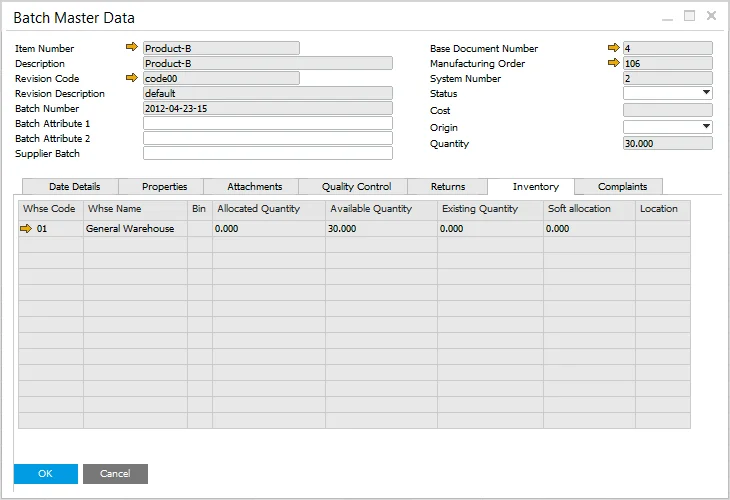
You can check Allocated, Available and Existing quantities in each location where the Batch is stored.
- Existing Quantity: a sum of all quantities of an Item across all warehouses.
- Allocated Quantity: a sum of all quantities of an Item that has already been used in sales and inventory documents.
- Available Quantity: a sum of all quantities that is available to be used. Existing Quantity - Allocated Quantity = Available Quantity.