You are currently viewing documentation for CompuTec ProcessForce 2.0, which will be supported only until December 31, 2026. After this date, the product will no longer receive regular support or maintenance updates.
We recommend upgrading to CompuTec ProcessForce 3.0, which is a plugin installed and managed through CompuTec AppEngine 3.0, built on .NET 8.
However, please note that CompuTec AppEngine 3.0 has a different architecture, and all CompuTec components, including the CompuTec ProcessForce 3.0 plugin, need to be updated together to ensure full compatibility.
Before starting your installation or upgrade process, we strongly recommend reviewing the CompuTec AppEngine 3.0 and CompuTec ProcessForce 3.0 documentation.
Overview
In manufacturing, a Bill of Materials (BOM) can have a multi-level structure, meaning that an item within a BOM may have its own BOM. This hierarchical structure helps define how components and subassemblies come together to create a final product.
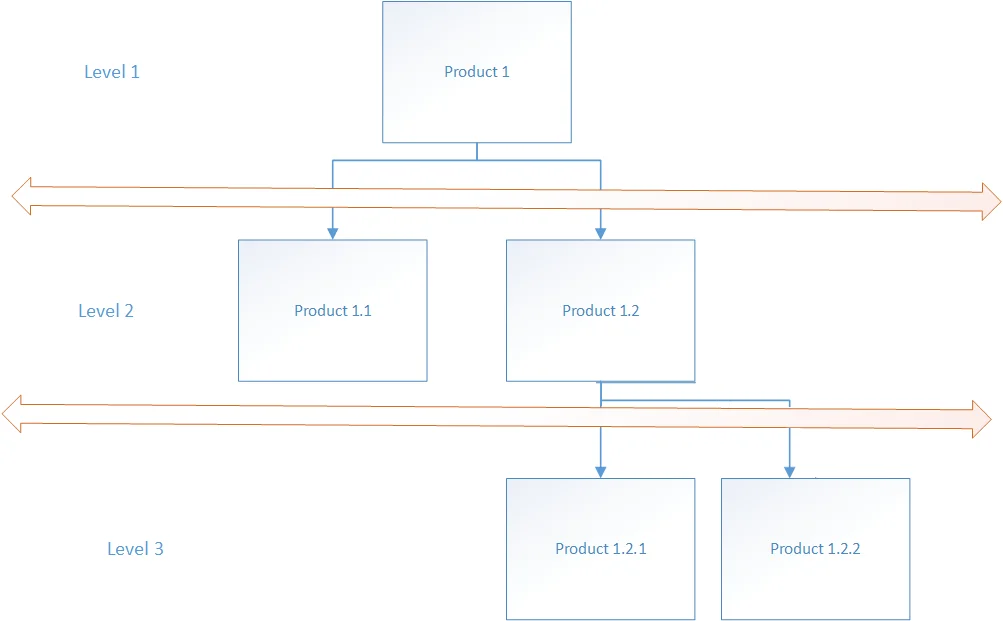
For example, in the diagram below:
- Product 1 is the final good.
- Its BOM consists of Product 1.1 and Product 1.2.
- Product 1.2 has its own BOM, which includes Item 1.2.1 and Item 1.2.2.
In CompuTec ProcessForce, there are two ways of dealing with this situation:
-
Semi-finished Items: A semi-finished item is a component in the BOM that has its own Bill of Material and requires a separate Manufacturing Order (MO) before being used in the production of the final good. These items can also be produced independently and stored as inventory for future use.
-
Phantom Item: A phantom item exists within a BOM structure but is not manufactured or stored separately. Instead, its components and operations are directly incorporated into the Manufacturing Order of the final good, eliminating the need for a separate MO. Phantom items streamline the production process by simplifying BOM management.