You are currently viewing documentation for CompuTec ProcessForce 2.0, which will be supported only until December 31, 2026. After this date, the product will no longer receive regular support or maintenance updates.
We recommend upgrading to CompuTec ProcessForce 3.0, which is a plugin installed and managed through CompuTec AppEngine 3.0, built on .NET 8.
However, please note that CompuTec AppEngine 3.0 has a different architecture, and all CompuTec components, including the CompuTec ProcessForce 3.0 plugin, need to be updated together to ensure full compatibility.
Before starting your installation or upgrade process, we strongly recommend reviewing the CompuTec AppEngine 3.0 and CompuTec ProcessForce 3.0 documentation.
Non-Batch Controlled Items
Here, you can check how to perform Bin Locations and Allocations on Pick Order for Non-Batch Controlled Items.
Pick Order
Issue to Production Process
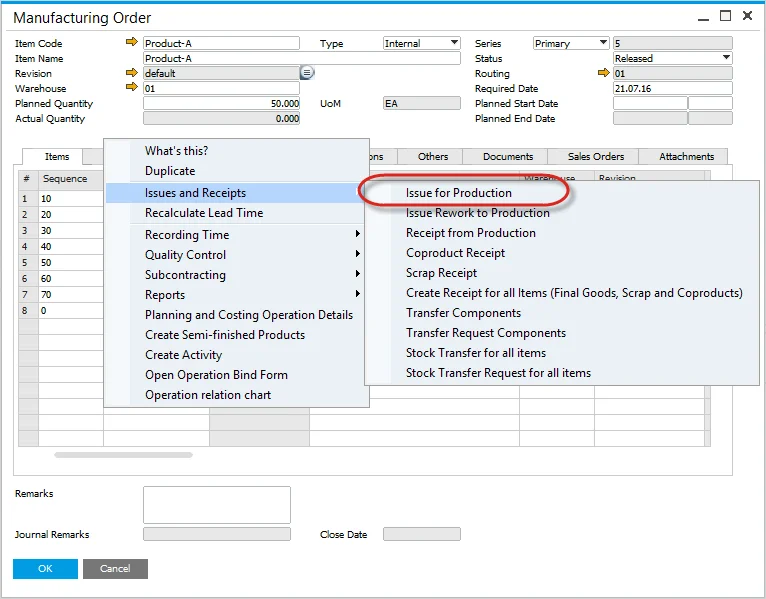
Select from the context menu, Issues and Receipts, Issue to Production.
Non-Batch Controlled Items
- Enter the amount of inventory to be picked within the Picked Quantity field.
- Click on the yellow arrow in Bin Location Allocation to select Bin Location.
- Bin Location Allocation - Pick Order form opens.
- Manually enter a value in Allocated or select one of the Automatic Allocation functions.
Production Goods Issue
To complete the transaction:
- Open the context menu and select Production Goods Issue.
- Click add to confirm the Production Goods Issue.
This action removes the items from the warehouse, issues them to Work in Progress (WIP), and generates the corresponding financial journal entry.