You are currently viewing documentation for CompuTec ProcessForce 3.0, which is a plugin installed and managed through CompuTec AppEngine 3.0, built on .NET 8. If you are working with older environments, you may need the documentation for CompuTec ProcessForce 2.0: https://learn.computec.one/docs/processforce/2.0/.
Please note that CompuTec ProcessForce 2.0 will be supported only until December 31, 2026. After this date, the product will no longer receive regular support or maintenance updates. Read more
CompuTec AppEngine 3.0 introduces a new architecture, and all CompuTec components, including the CompuTec ProcessForce 3.0 plugin, must be updated together to ensure full compatibility.
Before starting your installation or upgrade process, we strongly recommend reviewing the CompuTec AppEngine 3.0 and CompuTec ProcessForce 3.0 documentation.
Data Restore
Data restoration ensures synchronization and data integrity between SAP Business One and CompuTec ProcessForce. When items, costs, or manufacturing data are created or modified in SAP Business One, CompuTec ProcessForce automatically updates related objects — such as revisions, costing records, and classifications - to maintain consistency.
However, if data is added manually or via Data Transfer Workbench (DTW) while ProcessForce is not installed or active, synchronization may fail. In such cases, the Restore functions must be executed to rebuild internal links and prevent system inconsistencies or performance issues.
Purpose
The Data Restore functions help you:
- Rebuild synchronization between SAP Business One and CompuTec ProcessForce.
- Ensure that Item, Costing, Resource, and BOM data are properly aligned.
- Prevent missing records or slow system performance caused by data inconsistencies.
When to Use Data Restore
Run the restore functions in the following situations:
- CompuTec ProcessForce is newly installed in an existing SAP Business One database.
- Data (such as Items, BOMs, or Batches) was created using DTW or while ProcessForce was not active.
- System inconsistencies or synchronization warnings appear during daily operations.
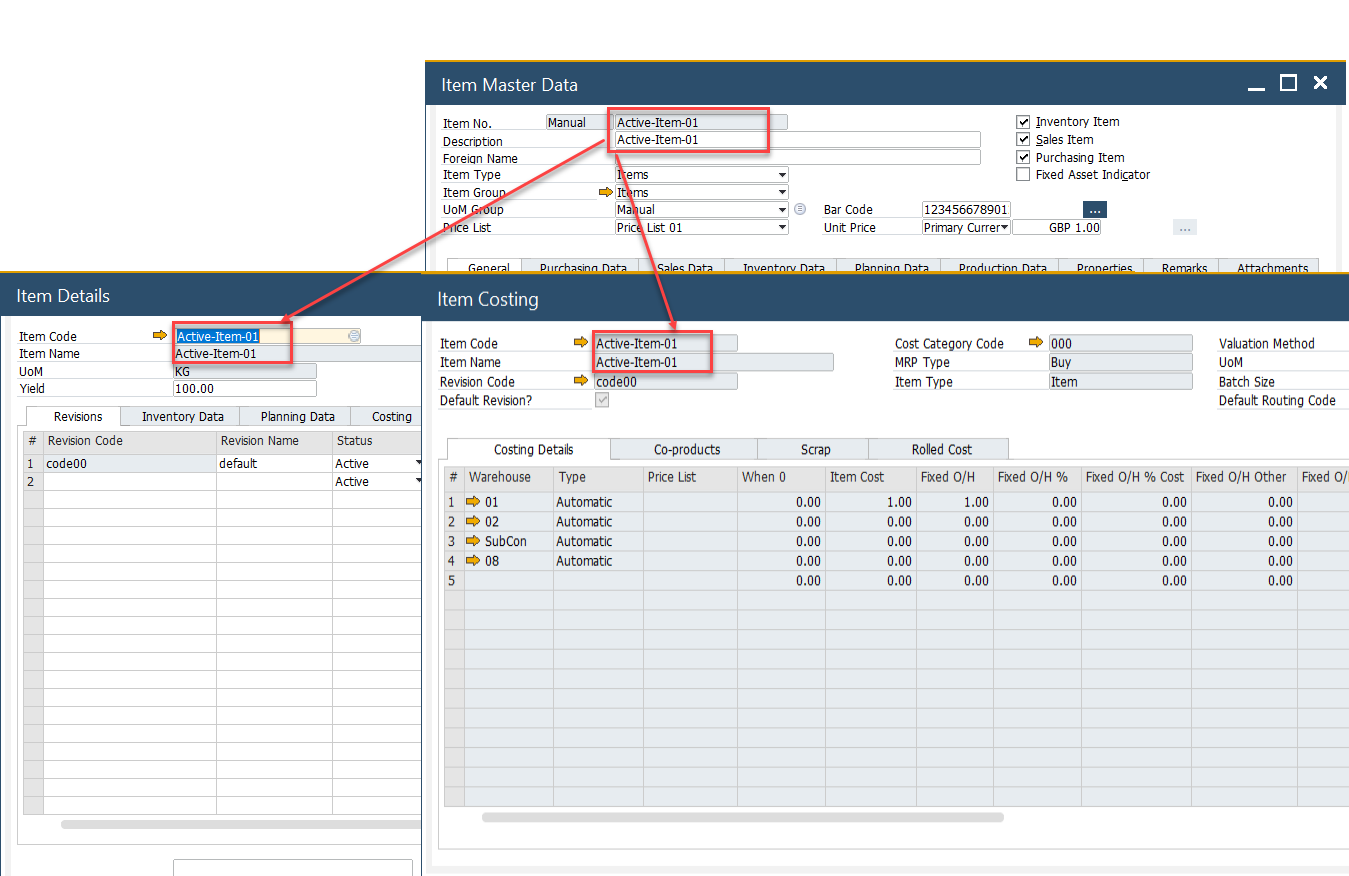
Data synchronization between SAP Business One and CompuTec ProcessForce is crucial for maintaining system performance and data integrity. When users add, modify, or delete Item Master Data in SAP Business One, key data elements are automatically updated in CompuTec ProcessForce, including:
- Item Details: a default revision code is created.
- Item Costing: a cost record is generated for an item, revision, and warehouse.
- Cost Category: cost classification is updated accordingly.
However, if data is added manually or via Data Transfer Workbench (DTW) while CompuTec ProcessForce is not installed or running, Restore functions must be executed. Failing to run these functions may result in slow system performance and inconsistencies between SAP Business One and CompuTec ProcessForce.
After installing CompuTec ProcessForce, ensure that the following restore functions are run to synchronize data properly:
- Batch Details
- Bill of Materials
Restore Functions Overview
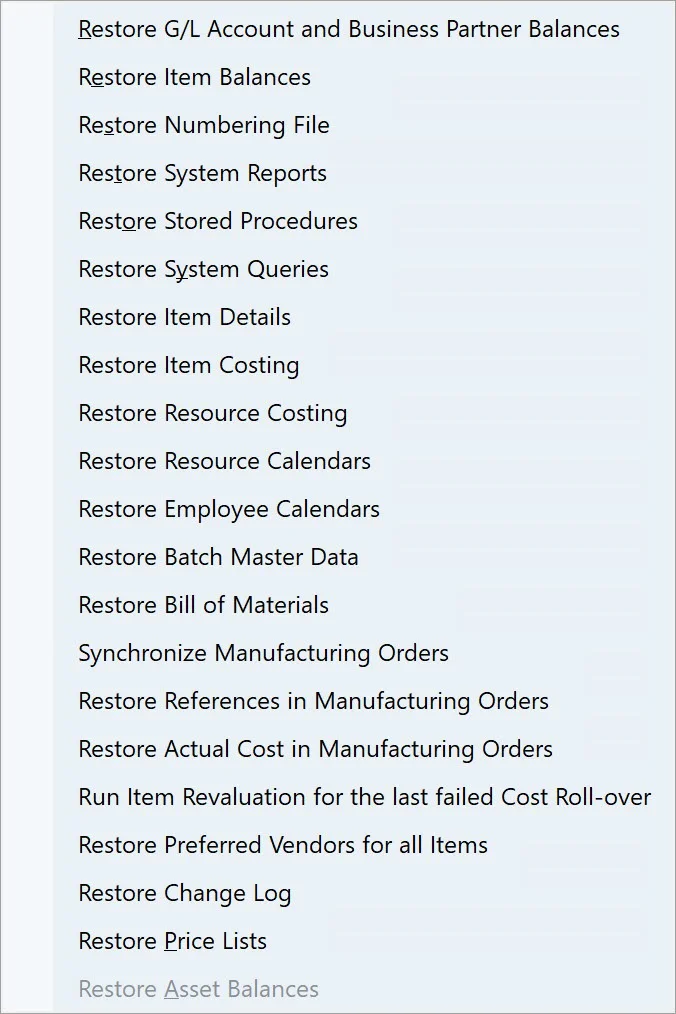
Each restore function targets a specific data area in SAP Business One and CompuTec ProcessForce.
| Restore Function | Purpose |
|---|---|
| Batch Details | Rebuilds and synchronizes batch master data. |
| Bill of Materials | Ensures BOM description and variant synchronization. |
| Item Details / Item Costing | Restores missing item-level and cost-level data. |
| Resource Costing | Recreates cost records for resources by category. |
| Resource / Employee Calendars | Rebuilds missing calendar records. |
| Goods Issue / Goods Receipt | Fixes broken document references in Manufacturing Orders. |
Restore Batch Details
To access Restore Batch Master Data, navigate to:
Help → Support Desk → Restore → Restore Batch Master Data
- The SAP Batch Details and CompuTec ProcessForce Batch Master Data are combined into a single, unified form.
- Run this restore function to populate the combined batch data object.
- If you’ve added User-Defined Fields (UDFs) to SAP Batch Details, add the same fields to ProcessForce Batch Master Data tables for compatibility.
- When inconsistencies exist between SAP and ProcessForce batch data, executing this restore updates SAP Batch Details using ProcessForce data.
Restore Bill of Materials
To access Restore Bill Of Materials, navigate to:
Help → Support Desk → Restore → Restore Bill Of Materials
Use this function to ensure that changes in item descriptions (e.g., via DTW or PowerShell) are reflected in Bill of Materials and Choose From Lists.
Synchronization Rules:
- Synchronization always flows from ProcessForce → SAP Business One.
- Creating or updating a ProcessForce BOM overwrites the corresponding SAP BOM.
- The option “Enable Bill of Materials synchronization between CompuTec ProcessForce and SAP Business One” must be enabled in General Settings (ProcessForce → Bill of Materials and Manufacturing Orders).
- Only BOM variants with Is MRP Default checked are synchronized.

Note:
The BOM restore only updates descriptions — not production trees or BOM structures.
It synchronizes theItemNamefield from theOITMtable to theU_Descriptionfield inCT_PF_OBOM.
➡️ Learn more about General Settings.
Restore Item Data
To access Restore Item Details and Restore Item Costing, navigate to:
Help → Support Desk → Restore → Restore Item Details
Help → Support Desk → Restore → Restore Item Costing
Use these restore functions if:
- The database contained Item Master Data before installing CompuTec ProcessForce.
- Items were created while ProcessForce was inactive or not integrated.
Restore Item Details
When a new Item Master Data record is created in SAP Business One, a corresponding Item Details record should appear in ProcessForce. If missing, run Restore Item Details to generate these records and ensure synchronization.
Restore Item Costing
Run this function to recreate cost records for every item across all revisions and cost categories.
Upon initiating an Item Costing restore, the following system message appears:
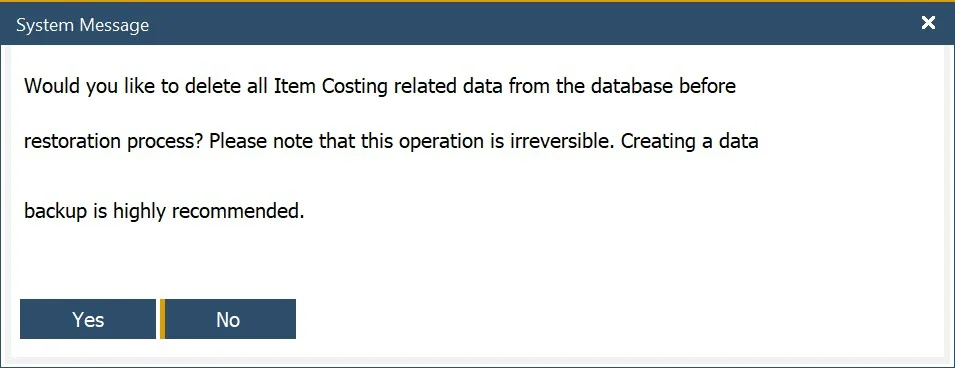
By default, the No option is preselected.
Restore Resource Costing
To access Restore Resource Costing, navigate to:
Help → Support Desk → Restore → Restore Resource Costing
This function creates missing Resource Costing records for each resource and cost category, ensuring accurate financial alignment within ProcessForce.
Restore Resource Calendar and Employee Calendar
To access Restore Resource Calendar and Restore Employee Calendar, navigate to:
Help → Support Desk → Restore → Restore Resource Calendars
Help → Support Desk → Restore → Restore Employee Calendars
When Resource or Employee Master Data is created, a corresponding Calendar is automatically generated.
If missing (due to data imports or inactive integration), run the appropriate restore function to create these calendars.
Restore Goods Issue and Goods Receipt Restore
This function restores all Goods Issue and Goods Receipt references within Manufacturing Orders.
The purpose of this option is to address scenarios where a Goods Issue or Goods Receipt document has been deleted, yet the reference remains in the Manufacturing Order's Document tab. This situation can lead to errors when attempting to update the Manufacturing Order.
You can automate some of data restoration task by using CompuTec AppEngine Background Processes. Click on the documentation to know more.
If issues persist after restoring, consult your system administrator or contact CompuTec Support