You are currently viewing documentation for CompuTec ProcessForce 3.0, which is a plugin installed and managed through CompuTec AppEngine 3.0, built on .NET 8. If you are working with older environments, you may need the documentation for CompuTec ProcessForce 2.0: https://learn.computec.one/docs/processforce/2.0/.
Please note that CompuTec ProcessForce 2.0 will be supported only until December 31, 2026. After this date, the product will no longer receive regular support or maintenance updates. Read more
CompuTec AppEngine 3.0 introduces a new architecture, and all CompuTec components, including the CompuTec ProcessForce 3.0 plugin, must be updated together to ensure full compatibility.
Before starting your installation or upgrade process, we strongly recommend reviewing the CompuTec AppEngine 3.0 and CompuTec ProcessForce 3.0 documentation.
Quality Control Tests Creation Wizard
The Quality Control Tests Creation Wizard allows users to mass-create Quality Control Test documents, which is particularly useful for generating documents that may have been missed by automated processes.
Quality Control Test → Quality Control Tests Creation Wizard
Step 1. Document Types and Dates
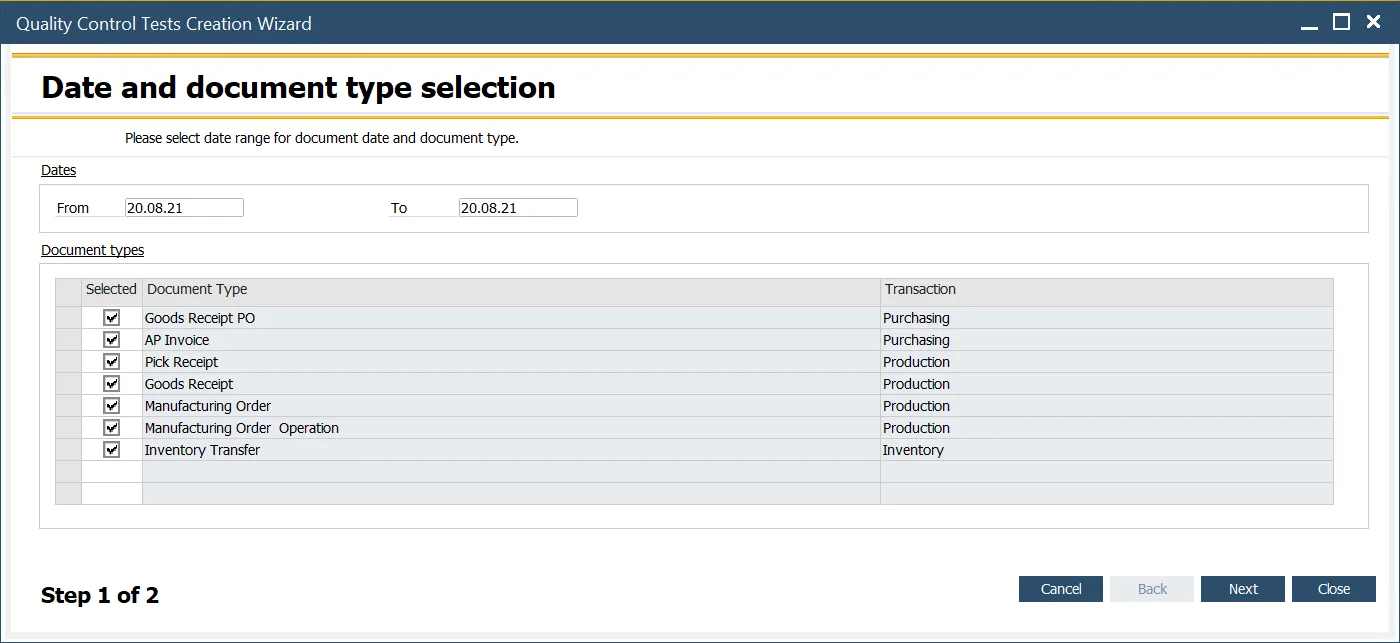
In this first step, select the document type(s) for which Quality Control Test documents will be generated, and define the date range for the base documents.
Step 2. Choosing Specific Documents
In the second step, a list of documents is displayed based on the filter conditions applied in the previous step. This list shows documents that have not yet had associated Quality Control Tests created. To select the documents, check or uncheck the boxes in the "Selected" column. Once the desired documents are chosen, click "Run" to create the corresponding Quality Control Test documents.