You are currently viewing documentation for CompuTec ProcessForce 2.0, which will be supported only until December 31, 2026. After this date, the product will no longer receive regular support or maintenance updates.
We recommend upgrading to CompuTec ProcessForce 3.0, which is a plugin installed and managed through CompuTec AppEngine 3.0, built on .NET 8.
However, please note that CompuTec AppEngine 3.0 has a different architecture, and all CompuTec components, including the CompuTec ProcessForce 3.0 plugin, need to be updated together to ensure full compatibility.
Before starting your installation or upgrade process, we strongly recommend reviewing the CompuTec AppEngine 3.0 and CompuTec ProcessForce 3.0 documentation.
Selecting Manufacturing Orders
You can use the extended filter option to quickly pick Manufacturing Orders which will be presented on the Gantt chart.
Selecting Manufacturing Orders
There are multiple methods in selecting orders. In this example, it is by Required Date "From," "To."
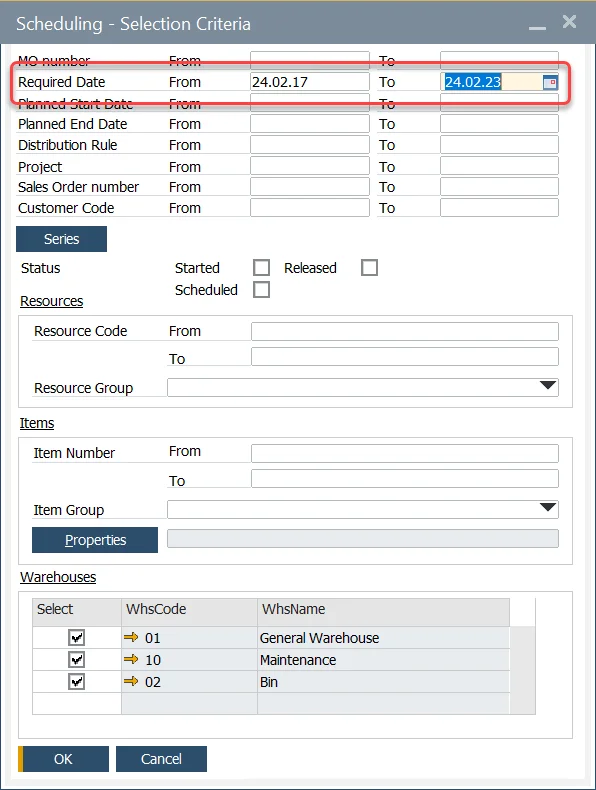
You can also choose Manufacturing Orders by Status, Used Resources, Manufacturing Order Item, and Warehouse. You can also mix the criteria.
Deselecting Manufacturing Orders
-
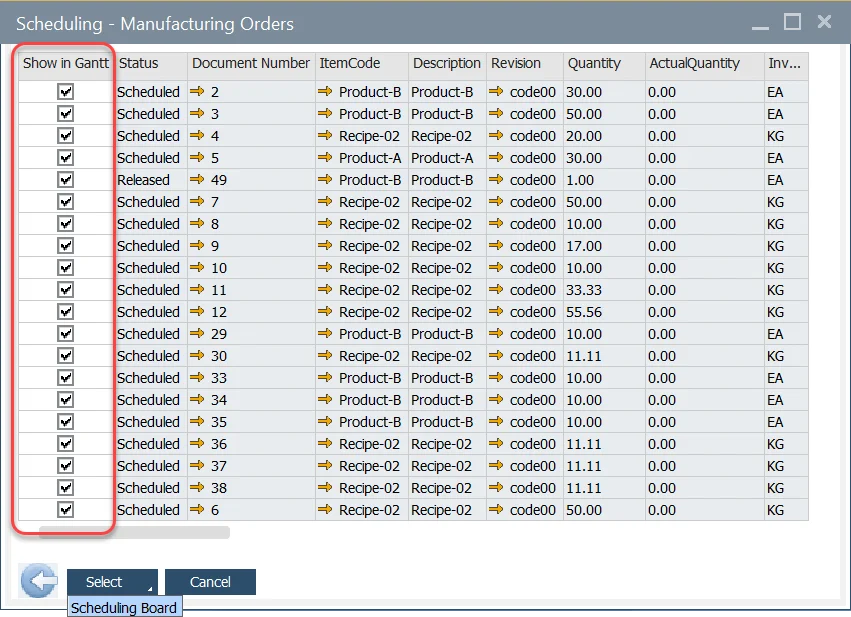
All Manufacturing Orders are automatically selected.
-
To deselect a specific order, uncheck the line.
-
To deselect all the orders, click on the column heading "Show in Gantt."
-
Press the Select button to display these orders within the Gantt display.
-
Clicking the arrow down on the Select button allows you to go to Scheduling Board.