You are currently viewing documentation for CompuTec ProcessForce 2.0, which will be supported only until December 31, 2026. After this date, the product will no longer receive regular support or maintenance updates.
We recommend upgrading to CompuTec ProcessForce 3.0, which is a plugin installed and managed through CompuTec AppEngine 3.0, built on .NET 8.
However, please note that CompuTec AppEngine 3.0 has a different architecture, and all CompuTec components, including the CompuTec ProcessForce 3.0 plugin, need to be updated together to ensure full compatibility.
Before starting your installation or upgrade process, we strongly recommend reviewing the CompuTec AppEngine 3.0 and CompuTec ProcessForce 3.0 documentation.
Logging
You may be asked to send CompuTec ProcessForce log files during the support procedure. Adding them to a support ticket (even without the request) may speed up the support procedure. On this page, you can find out where to find the files.
Log files directories
CompuTec ProcessForce
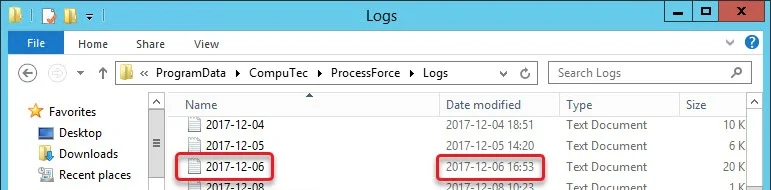
The CompuTec ProcessForce log files are kept in the following location: C:\ProgramData\CompuTec\ProcessForce\Logs.
Choose the file that is related by time and date to the issue you are reporting:
CompuTec License Server
The CompuTec License Server log files are kept in the following location: C:\ProgramData\CompuTec\License Server\Logs.
Additional options
Please note that changes described in this section (raising the log level or adding new rules) can significantly impact the system's performance. Therefore it is recommended to turn it on only during problem investigation (and to turn it off afterward).
Log level
If it is needed or asked by support, the log level can be raised in the following file: C:\Program Files\SAP\SAP Business One\AddOns\CT\CompuTec ProcessForce\X64Client\NLog.config.
It is possible to add a rule to save all queries executed on a database to a log file.
To enable the option, it is required to:
-
Go to
Nlog.configfile. A default location of it isC:\Program Files\SAP\SAP Business One\AddOns\CT\ProcessForce. -
uncomment the following line (remove
<!--and-->):<!--<logger name="QueryNLogger" minlevel="Trace" writeTo="fileEventLogForQueries" />-->
Once the following step is done, all database queries will be logged by default in this location: C:\ProgramData\CompuTec\ProcessForce\Log.
By default, log files are saved in this location with the current date as the name, e.g., 2023-12-15.log. After enabling the option, additional files will be held: with the queries prefix, e.g., queries 2023-12-15.log.

To disable the option, comment out the previously uncommented line (add <!-- and --> to it) in Nlog.config.