You are currently viewing documentation for CompuTec ProcessForce 3.0, which is a plugin installed and managed through CompuTec AppEngine 3.0, built on .NET 8. If you are working with older environments, you may need the documentation for CompuTec ProcessForce 2.0: https://learn.computec.one/docs/processforce/2.0/.
Please note that CompuTec ProcessForce 2.0 will be supported only until December 31, 2026. After this date, the product will no longer receive regular support or maintenance updates. Read more
CompuTec AppEngine 3.0 introduces a new architecture, and all CompuTec components, including the CompuTec ProcessForce 3.0 plugin, must be updated together to ensure full compatibility.
Before starting your installation or upgrade process, we strongly recommend reviewing the CompuTec AppEngine 3.0 and CompuTec ProcessForce 3.0 documentation.
Vehicle Inspection Reason
The Vehicle Inspection Reason feature allows you to create predefined values that can be used later in the Vehicle Inspection document. These reasons appear in a drop-down list for specific options (e.g., for documenting spoiled products, you can select "Rotten" as the Vehicle Inspection Reason). This feature ensures consistency and accuracy in categorizing inspection results.
You can access the Vehicle Inspection Reason setup through the following path:
Administration → Setup → Vehicle Inspection → Vehicle Inspection Reasons
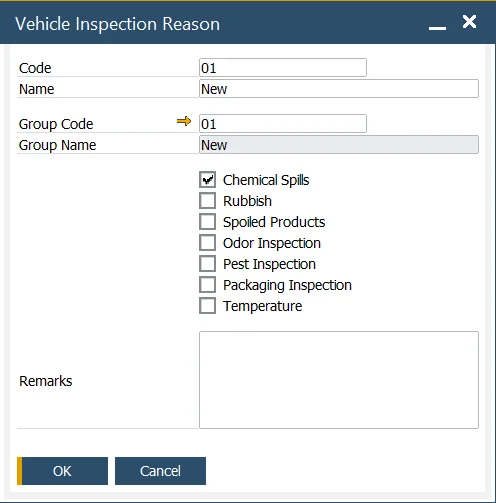
When setting up a Vehicle Inspection Reason, you can define both a Code and Name for each reason. Additionally, you can assign it to one of the predefined Group Codes, which helps organize and categorize the reasons.
By checking a specific checkbox, you can control which options will be available in the Vehicle Inspection document, streamlining the selection process during the inspection.
Vehicle Inspection Reason Group
The Vehicle Inspection Reason Group feature allows you to organize and manage related inspection reasons into groups. You can define the Code and Name for each Vehicle Inspection Group, making it easier to categorize and access reasons during the inspection process.
You can access the Vehicle Inspection Reason Group setup via this path:
Administration → Setup → Vehicle Inspection → Vehicle Inspection Groups
Vehicle Inspection Reason Group
This feature helps ensure that your inspection reasons are well-organized and easily selectable when completing vehicle inspections