You are viewing documentation for CompuTec PDC 4.0, which runs on CompuTec AppEngine 3.0 (.NET 8).
If you use CompuTec PDC 3.0, see the CompuTec PDC 3.0 documentation.
When upgrading to CompuTec PDC 4.0, update all required CompuTec components together to ensure compatibility.
Before installing or upgrading, review the CompuTec PDC Installation Guide and the system requirements.
Weight Management Board
The Weight Management Board provides users with a centralized interface to manage all weight-related documents efficiently.
Only users with Management Board privileges can access this feature.
Access
Users can access the Weight Management Board from the main application window:

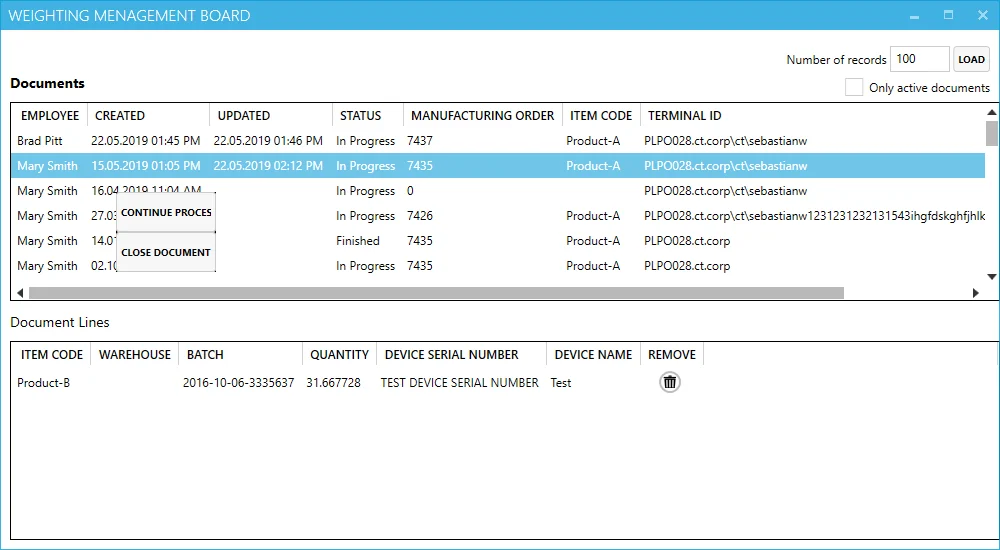
Weighting Management Board
Header
- Row Count: defines the number of rows displayed in the Documents Table.
- Only Active Documents: when checked, this option filters the table to show only documents with an "In Progress" status.
Documents Table
This table lists all weight documents. Right-clicking on a document in "In Progress" status opens a context menu with the following options:
- Continue Process: launches the Weighting Wizard for the selected document.
- Close Document: closes this document
Document Lines
This section displays item details for the selected document. Users can remove specific lines from the document as needed.