You are viewing documentation for CompuTec PDC 3.0, which is supported until December 31, 2026. After this date, it will no longer receive regular support or maintenance updates.
We recommend upgrading to CompuTec PDC 4.0, which runs on CompuTec AppEngine 3.0 (.NET 8).
When upgrading, update all required CompuTec components together to ensure compatibility. Read more
Downtime
Downtime refers to a temporary break in work caused by unforeseen circumstances, such as power outages or equipment failures. Properly tracking and managing downtime is essential for maintaining operational efficiency and minimizing disruptions. CompuTec PDC offers a straightforward method to register and monitor downtime effectively.
Downtime related settings
Employee Master Data
Technician / Is downtime Supervisor
General Settings, CompuTec ProcessForce and PDC tab
Within the General Settings, several options in CompuTec ProcessForce and PDC tabs influence downtime registration behavior:
- create a new task when downtime is registered.
- pause all tasks when downtime is registered.
- action when downtime is registered.
To know more, click here – these options define additional behaviour during Downtime registration.
Reporting Downtime
The process requires:
-
Downtime is reported using a Task Tile.
-
Setting a Downtime Reason.
-
Assigning a Technician. Saving the downtime entry.
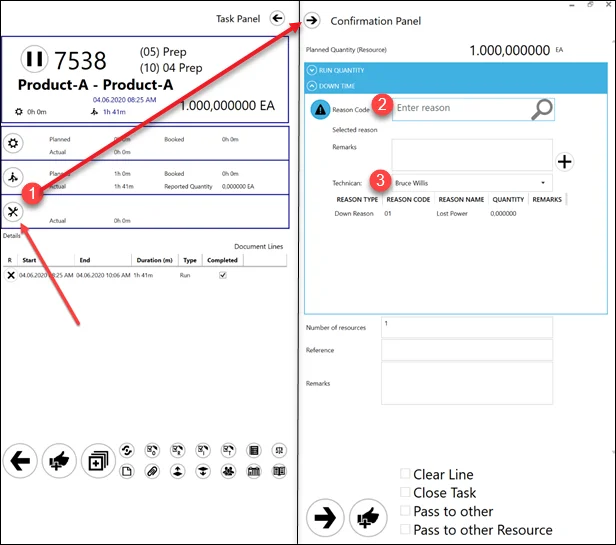
Interface Views
Adding a Downtime creates a Downtime tile available for the Technician chosen during creation and to Supervisors:
User view:
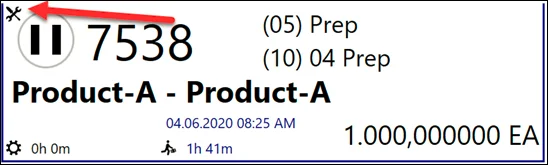
Technician and Supervisor view:

Supervisors have additional capabilities to reassign technicians and modify downtime parameters.