You are viewing documentation for CompuTec PDC 3.0, which is supported until December 31, 2026. After this date, it will no longer receive regular support or maintenance updates.
We recommend upgrading to CompuTec PDC 4.0, which runs on CompuTec AppEngine 3.0 (.NET 8).
When upgrading, update all required CompuTec components together to ensure compatibility. Read more
CompuTec PDC License Request
Acquiring a license for CompuTec PDC is a straightforward process. This guide explains the steps required to request a license file. Follow these instructions to ensure a smooth and timely request.
Steps to Request License
To obtain a license file, you need to create a support ticket via support.computec.pl. When submitting the request:
- Set the Type to Information.
- Set the Component to License Request.
- Provide the necessary details as mentioned below. (Type: Information, Component: License request) and provide the following information:
License type
Specify the intended environment and purpose of the license:
Environment:
- a customer server,
- a partner internal server.
Purpose:
- An official purchase,
- A demo/test license.
By default, demo/test licenses for CompuTec PDC/WMS are generated for two terminals/users.
System Information
To generate the license, the following information is required:
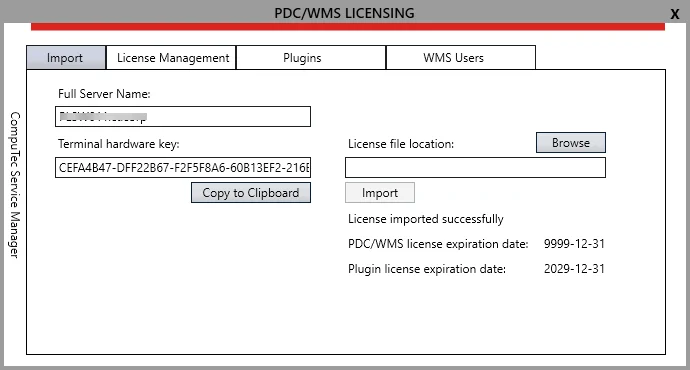
- Full Server Name,
- Terminal License Key (5 blocks of 8 characters, separated by a dash sign).
This information can be found in the CompuTec PDC/WMS Licensing window under the Import tab.
Access the CompuTec PDC/WMS Licensing Window through the below path:
CompuTec Service Manager application → PDC/WMS Licensing button
To provide system information:
-
Use the "Copy to Clipboard" button to copy the details.
-
Paste the copied information directly into your support ticket.